
Quick answer: A solar inverter that keeps tripping or shutting off is usually responding to a condition it is designed to protect against—not automatically failing. The fastest way to narrow it down is to note when it shuts down: immediately when a motor starts, after a period of heavy use, when battery voltage falls, when the unit gets hot, or when a grid warning appears.
Why a solar inverter shuts off
An inverter monitors its AC output, DC input, temperature, and—on grid-tied systems—the utility reference. Protection can open the output or stop conversion when the load exceeds its capability, the battery/DC bus falls outside limits, the electronics overheat, wiring or insulation indicates a fault, or grid voltage/frequency is outside the permitted operating window. Victron documentation, for example, lists overload, low battery voltage, high temperature, and excessive DC ripple as separate protection states.[3] Grid-connected systems may also stop producing when the grid reference is lost or abnormal; that behavior is a safety function, not proof that the inverter is defective.[2]
Do not assume that a flashing light or beep has the same meaning across brands. Record the exact message, LED pattern, time, load, battery voltage shown by the system, and whether the unit restarts by itself. For brand-specific code interpretation, use the solar inverter error-code guide after recording the symptom.
Quick symptom-to-cause guide
| What you observe | Most useful first branch | Safe next check |
|---|---|---|
| Trips as a fridge, pump, saw, or compressor starts | Startup surge or overload | Switch off the load; compare its starting demand with inverter surge and continuous ratings. |
| Runs, then shuts down after sustained use | Heat, low battery, or voltage drop | Check ventilation, ambient heat, battery state shown by the system, and load duration. |
| Low-battery warning or display goes dark under load | Battery sag, depleted battery, or DC path loss | Remove loads and follow the battery/inverter maker’s normal recharge and restart procedure. |
| Grid-tied unit reports grid voltage/frequency or islanding | AC/grid condition | Record the event and contact the installer or utility if it repeats; do not alter protection settings. |
| Ground/arc fault, burning smell, heat, water, or repeated breaker trip | Potential electrical hazard | Stop, isolate only as your documented procedure allows, and call a qualified professional. |
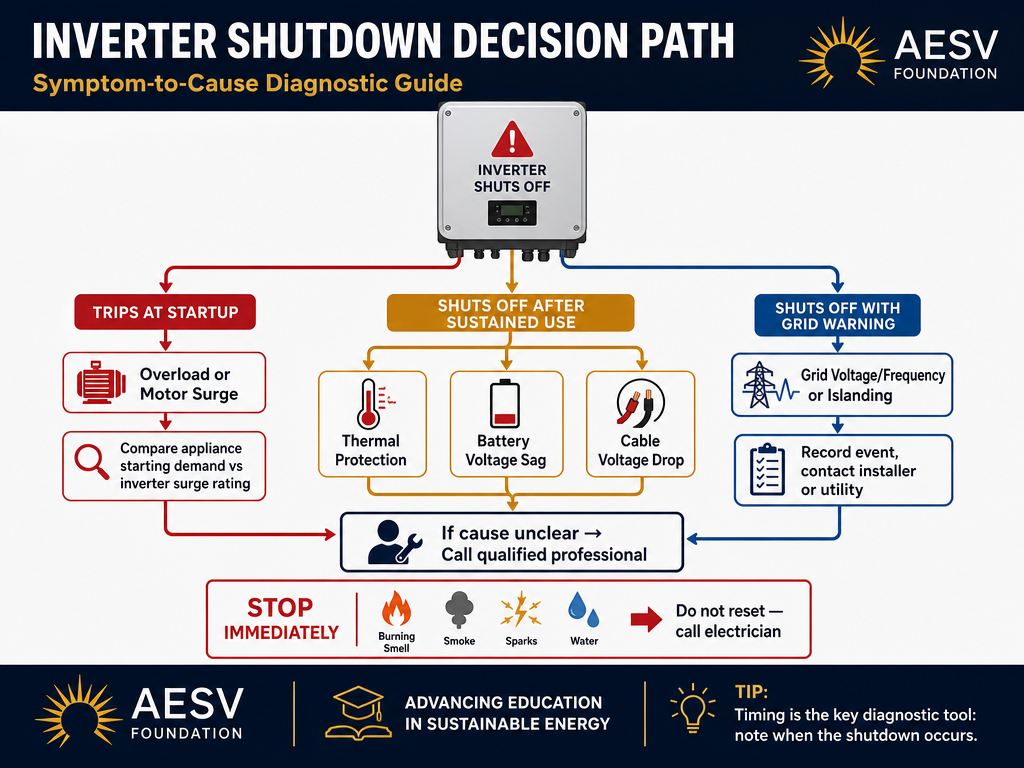
1. Overload or motor-starting surge
The inverter may support an appliance’s running wattage but not its brief starting demand. Refrigerators, freezers, pumps, compressors, and some power tools can cause a shutdown at startup. A trip that happens at the exact moment one appliance starts is a stronger overload clue than a trip that occurs after an hour of operation.
- Turn off or unplug nonessential AC loads, then try the system with a small known load.
- Start loads one at a time; do not test a pump, compressor, heater, and microwave together.
- Compare the appliance and inverter nameplates with the inverter’s continuous and surge ratings. Ratings are model-specific; do not apply a generic multiplier as a guarantee.
- If the system is undersized, reduce simultaneous loads or have the system redesigned. Do not defeat overload protection.
For a planning refresher, see AESV’s solar inverter sizing guide, which explains why surge demand and continuous watts must be considered together.[6]
2. Low battery voltage or DC voltage sag
A battery can look adequately charged at rest yet fall below the inverter’s protection threshold when a large current is drawn. The same symptom can result from a depleted battery, cold-weather limitations, an incorrect battery setting, excessive cable voltage drop, a loose or damaged connection, or a battery-management-system shutdown. Victron’s manual documents low-battery shutdown and a dynamic cutoff that depends on battery current and voltage.[3]
- Record the battery voltage or state shown by the inverter/app before and during the shutdown, if the equipment provides it.
- Reduce the AC load and allow the battery to charge using the manufacturer-approved source and settings.
- Visually check only accessible, de-energized external connections for corrosion, heat damage, or looseness; do not retighten energized terminals.
- If the battery is cold, has a BMS warning, or repeatedly cuts out despite a healthy charge, contact the battery/inverter installer or manufacturer.
Do not “solve” low voltage by raising cutoff values, bypassing a BMS, adding an arbitrary fuse, or substituting a charger profile. Those settings are part of the system design.
3. Overheating, blocked ventilation, or ambient heat
Inverters can reduce output or shut down when internal temperature rises too far. A shutdown that appears after sustained high load, in direct sun, in a hot enclosure, or with blocked air inlets is consistent with thermal protection. The equipment manual—not a universal temperature number—controls the safe operating limits.
- Turn off loads and let the equipment cool naturally.
- Check from the outside that vents are not covered by dust, stored items, nests, or insulation.
- Confirm the installation has the clearance and environmental conditions specified by the manufacturer.
- Do not spray water into the inverter or remove its cover to clean internal components.
If shutdowns recur at ordinary loads and temperatures, the fan, sensor, enclosure, or power stage may need professional inspection. DOE’s installation guidance emphasizes weather-resistant equipment placement and appropriate enclosures.[2]
4. Cable voltage drop, loose connections, or DC ripple
High current makes poor connections and undersized or overly long conductors more consequential. The inverter may see an input voltage that collapses under load even when the battery voltage appears normal at rest. A loose or damaged connection can also create heat, instability, or excessive ripple. This is a measurement and inspection job for a qualified person when it goes beyond an external visual check.
Look for a pattern: the shutdown follows high-power loads, the cable or lug is visibly discolored, the system reports ripple or DC input trouble, or the problem began after rewiring. Stop using the system if there is heat, melted insulation, odor, arcing, or a damaged connector. DOE also identifies cable management and electrical faults as performance and safety concerns.[2]
5. Grid voltage, frequency, or islanding protection
Grid-tied inverters are required to stop energizing the grid when the reference is absent or outside permitted conditions. A grid-voltage, grid-frequency, or islanding event can therefore look like a shutdown even when the inverter is healthy. SolarEdge troubleshooting guidance directs technicians to gather the event history, verify AC measurements and wiring, and consult the grid operator for persistent grid-voltage problems.[4]
- Record the exact grid event and whether neighbors or other equipment experienced flicker.
- Check only the normal external breaker/disconnect status described in your system documentation.
- If the event repeats, contact the installer and, where appropriate, the utility. Provide timestamps and event logs.
- Never change country, grid-protection, voltage, frequency, or reconnection settings simply to stop trips. Those are safety-critical settings.
6. Ground fault, arc fault, water, or damaged equipment
A ground-fault or arc-fault warning is not a nuisance to clear by repeated resets. Water intrusion, animal damage, abrasion, a failed connector, insulation damage, or internal failure can expose hazardous conditions. DOE recommends checking for ground faults after nuisance tripping, while the manufacturer checklist warns against re-energizing a tripped AC breaker before investigating possible internal damage.[1][4]
Stop work and arrange qualified service if there is smoke, an acrid or burning smell, visible arcing, melted plastic, a hot connector, water inside the enclosure, a damaged battery, tingling/shock, or a breaker that immediately trips again. NFPA likewise lists frequent breaker trips, warm or discolored outlets, burning smells, flickering, and sparks as reasons to call a qualified electrician.[5]
A safe 10-minute diagnostic sequence
This sequence is for observation and load reduction only. Follow the equipment manual if it differs, and stop at any step that requires opening equipment or taking electrical measurements.
- Write down the exact symptom, code, LED pattern, and time.
- Note what was running and whether the shutdown occurred at startup or after sustained operation.
- Switch off nonessential loads; disconnect a suspect appliance using its normal control.
- Check externally for blocked vents, direct heat, water, impact, burning odor, or damaged cables.
- Record the battery/DC and AC/grid information shown by the monitoring system, without opening covers.
- Check the documented external disconnect and breaker status; do not repeatedly reset a breaker that trips again.
- Allow a hot unit to cool and follow the manufacturer’s normal restart procedure once the cause is understood.
- If the problem repeats, export or photograph the event log and contact the installer/manufacturer.
- Ask for qualified testing of voltage drop, connections, insulation/ground faults, temperature, and grid conditions where relevant.
- Only return the system to normal service after the cause is corrected and the system remains stable under an appropriate test load.
For system planning rather than fault diagnosis, the AESV solar backup calculator can estimate loads, battery capacity, array size, and controller class. It explicitly does not size wiring, fuses, breakers, or inverters and does not account for motor-starting surge, so treat it as an educational planning tool—not a repair test.[8]
When is the inverter actually bad?
Replacement should be considered only after the external load, battery/DC supply, cabling, ventilation, AC/grid conditions, insulation, and event history have been checked by the appropriate person. A recurring fault with verified inputs and no external fault may indicate damaged hardware, but a symptom alone is not enough to condemn the inverter. Preserve the model number, firmware, event log, installation date, and photographs for the installer or manufacturer.
FAQ
Why does my inverter shut off when the fridge starts?
The compressor’s starting demand may exceed the inverter’s available surge capacity, or the battery/DC voltage may sag under the combined demand. Test with other loads off and compare the appliance and inverter ratings; do not assume a generic surge factor proves compatibility.
Why does the inverter work for a while, then shut down?
Timing after sustained use makes heat, battery depletion, or voltage drop worth investigating. Check external ventilation and the system’s displayed battery/event information, then arrange qualified testing if the pattern returns.
Should I keep resetting a tripping inverter?
No. A reset is not a diagnosis. If a ground/arc warning, burning smell, visible damage, or repeated breaker trip is present, stop and get qualified help. DOE specifically says not to rely on turning the system off and on after nuisance tripping.[1]
Can I change the inverter’s voltage or grid-protection settings?
Do not change safety or grid settings to prevent shutdowns. Contact the installer or utility when the system reports persistent grid conditions; settings must match the approved design and local requirements.[4]
When should I call an electrician or solar installer?
Call when the fault repeats, a breaker trips again, the battery/DC path needs measurement, an enclosure must be opened, or you see heat, odor, water, smoke, sparks, ground faults, or damaged insulation. Electrical systems can remain energized even when the inverter display is off.[3][4]
