
Affiliate Disclosure: AESV is reader-supported. If you buy through links on this page, we may earn a commission at no extra cost to you. Product listings change often, so verify the exact model, seller, warranty, voltage, and return policy before buying. As an Amazon Associate, AESV earns from qualifying purchases.
Last updated: July 2026
Quick verdict: For home backup, the first question is not “what battery brand?” but “how many kWh do I actually need?” Start with critical loads, then size the battery bank for runtime and depth of discharge.
If you are not sure where to start, use the AESV solar backup calculator, then compare your result with the battery and inverter guidance in the inverter guide and the battery backup guide.
Quick answer: Most homeowners need to convert appliance watts into daily watt-hours, then into usable battery capacity. For larger systems, 48V LiFePO4 is usually the cleanest architecture.
Home battery backup options at a glance
These are starting points, not fixed prescriptions. Battery brand pages rotate often, so the links below go to live Amazon searches. That keeps the guidance current while still pointing you toward the right category.
| Recommended starting point | Best for | What to check |
|---|---|---|
| 48V server-rack battery | Critical loads, garage installs, modular home backup | Check usable kWh, continuous discharge rating, communication ports, and whether the battery is listed for wall or rack mounting. |
| 48V wall-mount battery | Cleaner home installs and utility-room setups | Confirm voltage, inverter compatibility, and whether the battery can be expanded later without fighting the BMS. |
| Battery busbar and cable kit | Any multi-battery bank | Use proper lugs, fuses, and cable sizing so the bank is not limited by cheap wiring. |
| 48V inverter-charger | Home backup and whole-home systems | Match the inverter to both the battery bank and the loads. Split-phase support matters for many houses. |
| Critical loads panel and transfer switch | Homes that only need essential circuits backed up | Often the smartest way to lower battery cost while keeping food, lights, and internet on. |
If you are unsure whether a full whole-home battery is worth it, start with critical loads. That usually gives the best value for the money.
How to size a home battery bank
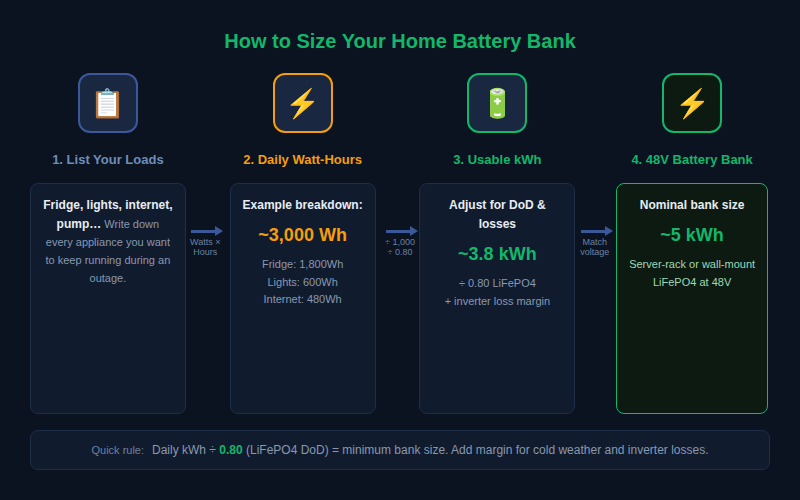
Sizing is easier once you stop thinking in “battery count” and start thinking in usable energy. The workflow is simple: list the loads you want to keep on, estimate how many hours they need to run, and convert that to kWh.
Basic math: Appliance watts × hours of use = watt-hours. Add up the watt-hours, divide by 1,000 to get kWh, then adjust for usable depth of discharge and inverter losses.
- Example: A 150W refrigerator running 12 hours a day uses 1,800Wh or 1.8kWh.
- Example: LED lights at 100W for 6 hours add another 0.6kWh.
- Example: Internet gear at 20W for 24 hours adds 0.48kWh.
That small list already points to roughly 3kWh per day before you add pumps, medical devices, or cooking loads.
Turn kWh into 48V battery size
Once you know the daily energy requirement, convert it into battery size. 48V systems are easier to size because the current stays manageable and the battery bank stays flexible.
| Usable energy target | Typical home use | Rough 48V bank size | Notes |
|---|---|---|---|
| 2–4kWh | Router, lights, fridge, phone charging | About 4–6kWh nominal | Good for short outages and critical loads only. |
| 5–10kWh | Critical loads plus some comfort loads | About 8–14kWh nominal | Common sweet spot for a family home with a transfer switch. |
| 10–20kWh+ | Whole-home backup or larger autonomy goals | About 15–30kWh nominal | Usually needs inverter-charger or hybrid inverter planning. |
A rough shortcut for LiFePO4 is to divide your daily kWh target by 0.8 to account for usable depth of discharge, then add a little margin for inverter losses and cold-weather performance. AGM needs more headroom because you usually use less of the bank.
Battery types that actually make sense at home scale
Server-rack batteries
Great for modular 48V home backup. They stack neatly, make expansion easier, and often include communication ports that help the inverter and battery talk to each other.
Wall-mount batteries
Cleaner visually and often better for a finished utility room. They can be a strong fit when the homeowner wants the system to look more integrated.
DIY prismatic cells
Potentially lower cost, but they ask more of the builder. You need to respect busbars, compression, BMS selection, fusing, and enclosure design. This is not the easiest first project for most readers.
Lead-acid at home scale
Still usable for some budget systems, but the weight, lower usable capacity, and shorter lifespan make it a weaker choice for larger backup plans.
Why series, parallel, and communication matter
Once the battery bank gets larger, the system is no longer just “more batteries.” The way batteries are connected changes the voltage, current, and safety profile. For home backup, 48V architecture keeps the current lower and the wiring more manageable.
- Series raises voltage.
- Parallel increases capacity at the same voltage.
- CAN/RS485 communication helps some batteries and inverters coordinate charging and protection.
- Busbars and fusing keep the bank balanced and protect the system if something fails.
Homeowner takeaway: If you are building a big battery bank, the wiring plan matters as much as the battery brand.
Critical loads panel vs whole-home backup
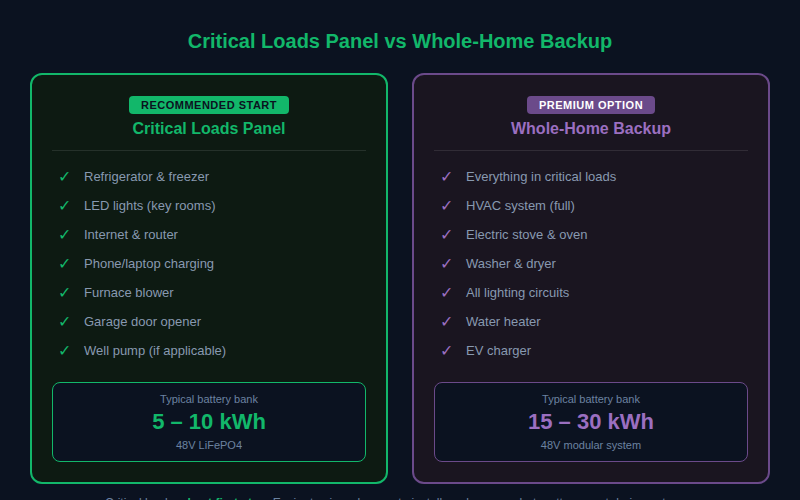
A critical loads panel usually backs up the circuits that matter most: fridge, lights, internet, outlets, furnace blower, and maybe a well pump. Whole-home backup tries to keep everything live. The second option is more expensive because it demands more inverter power and more battery capacity.
If the budget is tight, a critical loads setup often delivers the best first step. It is easier to size, cheaper to install, and much easier to explain to a homeowner who mainly wants the essentials on during outages.
Worked examples
Example 1: Two-bedroom home with refrigerator, lights, and internet
A reasonable critical-load package might land around 3–5kWh per day. That usually points to a 48V battery bank in the 5–8kWh nominal range if you want some cushion and are using LiFePO4.
Example 2: Four-bedroom home with well pump and furnace blower
This can jump quickly once pump and blower startup are included. It is common for the recommendation to move into the 10–15kWh nominal range or higher, especially if the homeowner wants several hours of runtime instead of a short bridge.
Example 3: Whole-home with day-and-night backup goals
If the goal is to keep most of the home behaving normally during an outage, the answer often becomes a larger 48V modular bank paired with a 6,000W+ inverter-charger or hybrid inverter.
Common sizing mistakes
- Starting with battery brand before estimating the actual load.
- Ignoring inverter losses and usable depth of discharge.
- Choosing a battery bank that is too small for the inverter’s appetite.
- Trying to build a big system without a clean critical-loads plan.
- Mixing old and new batteries in the same bank.
- Assuming a 12V architecture will scale comfortably into home backup.
Home battery backup FAQ
How many batteries do I need to back up a house?
That depends on what you want to keep on and for how long. A better question is how many usable kWh you need, because battery count depends on voltage, chemistry, and module size.
Is 48V always better than 12V?
For home backup, usually yes. Lower current makes the wiring easier to manage and the system scales much better.
Should I back up the whole house or only critical loads?
Critical loads are usually the better starting point unless you have a strong reason to run everything. It is cheaper, easier to size, and easier to install.
What battery chemistry is best for home backup?
LiFePO4 is the clean default for most new systems because it gives you more usable capacity and a longer cycle life than most lead-acid options.
Do I need battery communication?
Not always, but it is helpful when the battery and inverter support it. Communication can improve compatibility and make the system easier to manage.
Bottom line
For home backup, size the loads first, then the battery. If the system is small, critical-loads only, and budget-sensitive, a simple modular bank may be enough. If the goal is true home-scale resilience, 48V LiFePO4 with the right inverter and transfer strategy is usually the strongest path.
See also: AESV calculator, solar inverter guide, and bill savings guide.
